Wireless gaming headsets used to suck. Laggy audio, dead batteries mid-match, terrible sound quality. But 2025 is different. Modern wireless headsets hit near zero latency while lasting 30 to 70 hours per charge. Some even go 300 hours, which is honestly insane.
If you’re gaming on Windows, you want a headset with a 2.4GHz USB dongle for lag-free audio, solid mic quality for voice chat, and comfort that lasts through marathon sessions. Let’s break down the best options at every price point and what actually matters when picking one.

What Actually Matters in a Gaming Headset
Low Latency Wireless is Non-Negotiable
A 2.4GHz USB dongle is what separates gaming headsets from regular Bluetooth cans. We’re talking 10 to 30 milliseconds of latency, which is basically imperceptible. Wired headsets still have zero lag and never need charging, but good wireless is close enough that most people prefer the freedom.
Bluetooth by itself has too much lag for competitive gaming. If a headset only does Bluetooth, skip it unless you plan to use it wired.
Sound Quality Separates the Good from the Great
Look for clear, balanced drivers and support for virtual surround like Windows Sonic or Dolby Atmos. Premium models use special driver tech – the Audeze Maxwell has planar magnetic drivers that deliver audiophile-level sound.
Most gaming headsets come with companion apps that let you tweak EQ settings. Being able to boost mids for footsteps or crank bass for explosions makes a real difference.
Microphone Quality Matters for Team Play
A quality boom mic with easy mute is essential. Cardioid or super cardioid mics focus on your voice and reject background noise. Flip-to-mute designs are clutch – just flip the boom up and you’re muted.
If you stream or podcast seriously, headset mics have limits. You might want a separate USB mic for content creation. But for gaming and Discord, a good headset mic works great.
Comfort for the Long Haul
Memory foam or mesh earpads with adjustable headbands are what you need for 6-hour gaming sessions. The HyperX Cloud III Wireless gets praised as the most comfortable wireless headset people have worn. Weight matters too – lighter headsets cause less fatigue.
Try before you buy if possible because everyone’s head shape is different. What feels great to your friend might clamp your skull like a vice.
Battery Life You Can Actually Trust
Most wireless headsets last 30 to 40 hours per charge. Some go way longer – Razer’s BlackShark V3 hits 70 hours, HyperX Cloud Alpha Wireless does 300 hours, which is borderline ridiculous.
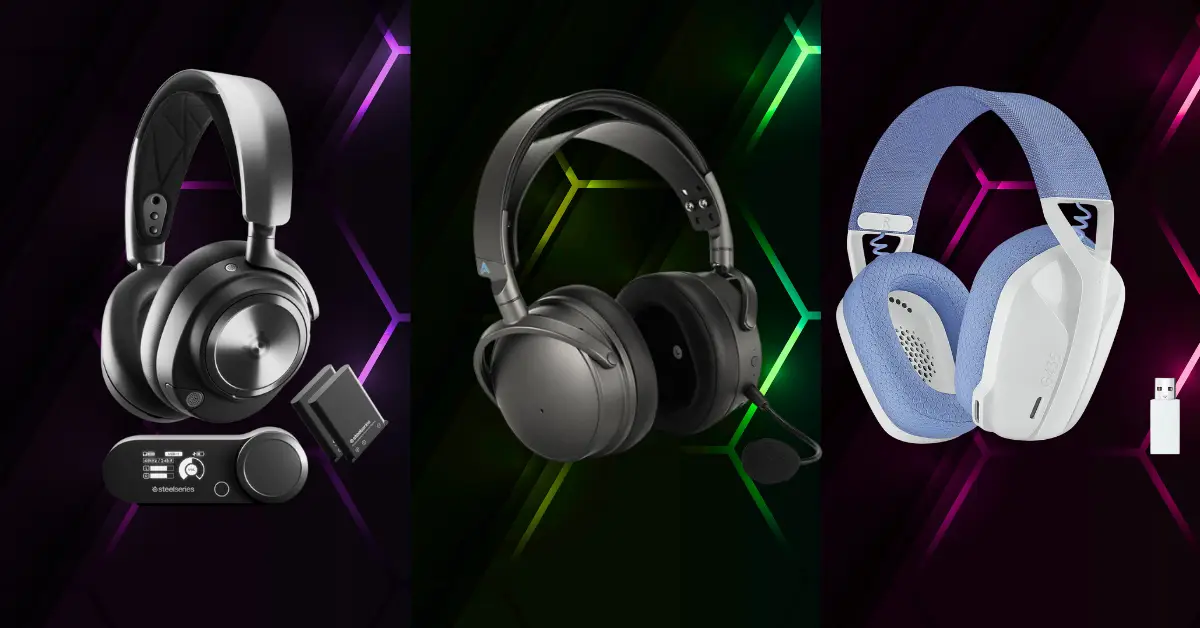
Swappable battery systems like the SteelSeries Arctis Nova Pro give you practically infinite runtime. One battery charges while you use the other. Check if headsets can charge while gaming or you’ll have forced downtime.
Price Points for Every Budget
Even sub-100 dollar headsets now use 2.4GHz wireless. High-end 200 plus models add premium materials, better drivers, and extras like noise cancellation or dual wireless. There’s a solid Windows-compatible option at basically every price point.
Top Wireless Headsets by Price
Budget Picks Under 100 Bucks
- Logitech G435 Lightspeed – Super light at 165 grams and cheap. USB dongle gives you 2.4GHz wireless with about 42 milliseconds latency on PC. Sound is decent for the price. Downside is it uses tiny internal mics instead of a boom, so voice quality suffers. Good if you mostly play solo.
- Corsair HS55 Wireless – Around 60 dollars with a detachable boom mic that flips to mute. 24-hour battery life and solid build quality for the price. Basic gaming audio that gets the job done without breaking the bank.
Mid Range 100 to 200 Dollars
- Razer BlackShark V3 – Dual wireless with 2.4GHz plus Bluetooth. 10 millisecond low latency mode for PC gaming and 70-hour battery. Lightweight with clear, detailed sound perfect for FPS games. Great all-arounder at this price.
- SteelSeries Arctis Nova 7 Wireless – 2.4GHz dongle with about 29 milliseconds latency plus Bluetooth. Over 33 hours battery and a crisp mic. Comfortable for long sessions and versatile enough for any game genre.
- Corsair Void Pro – Customizable RGB, dual wireless, 70-hour battery with flip-to-mute mic. Over-ear design with good sound quality. These mid-tier options balance features and performance without costing a fortune.
High End 200 Plus for Premium Performance
- Audeze Maxwell Wireless – Flagship planar magnetic headset with audiophile-grade sound. Dongle connection delivers 23 milliseconds latency. Heavy but incredibly well built with rich, detailed audio. Supports multi-device connections. This is endgame tier sound quality.
- SteelSeries Arctis Nova Pro Wireless – Top tier everything. Full 2.4GHz plus Bluetooth, swappable batteries for infinite playtime, premium build quality. Costs a chunk but delivers on all fronts.
- HyperX Cloud Alpha Wireless – 300-hour battery life is the headline feature. Solid sound quality, though the Razer BlackShark V3 edges it out on clarity. Still excellent for the price.
- Astro A50 X – Premium set with charging dock. Supports HDMI passthrough for consoles but works great on PC via USB. High-end audio with convenience features.
Specialty Options Worth Mentioning
- HyperX Cloud III Wireless – Over-ear build with super soft leatherette pads. Extremely comfortable for marathon gaming sessions. If comfort is your priority, this is it.
- Turtle Beach Atlas Air – First wireless open-back gaming headset. Wide soundstage for immersion with 50-hour battery. Open-back design leaks sound but feels more spacious and natural. Unique option if you game in a quiet space.
Matching Headsets to What You Actually Play
FPS Shooters Need Precision
Competitive games like CS:GO, Valorant, and Warzone demand pinpoint audio. Hearing exactly where footsteps come from wins gunfights. Ultra-low latency and sharp imaging matter most.
Razer BlackShark V3 with 10 millisecond latency or any quality wired headset work great. Tight, detailed sound and stable 2.4GHz connection keep audio synced perfectly with action on screen.
Battle Royale Wants Endurance
Fortnite and Apex matches last forever. Map awareness and long battery life both matter. Wide soundstage helps with positioning in huge open maps.
Turtle Beach Atlas Air, with its open-back design, gives expansive audio. High-end options like Audeze Maxwell add depth with premium drivers. Look for 50-plus hour battery so you never die to low charge warnings.
MMO and MOBA Prioritize Comfort and Comms
World of Warcraft raids and League ranked grinds last hours. Plush padding and a solid mic are non-negotiable. Clear voice chat matters for coordinating with your team.
HyperX Cloud III Wireless excels at comfort. Mid-range options like SteelSeries Nova 7 deliver good mic quality and can switch between PC and mobile for voice apps. Noise cancellation on the mic helps guild chat stay clear.
Open World RPG Demands Immersion
Single-player games like Elden Ring or Witcher 3 benefit from rich sound. Open-back designs and audiophile drivers reveal ambient details – wind, wildlife, distant thunder.
Atlas Air open-back or Audeze Maxwell excel here. Virtual surround modes from Dolby or DTS expand effects. You don’t need blistering low latency, so prioritize soundstage and audio quality.
All-Purpose Gaming Needs Versatility
If you play everything, get a balanced headset. Arctis Nova 7, Corsair Void Pro, or Razer BlackShark V3 handle shooters, RPGs, and even music or movies. Dual wireless with 2.4GHz plus Bluetooth gives you options.
Match your headset to what you play most. And try it on for comfort when you can because reviews can’t tell you if something fits your head right.
Getting the Most from Your Setup
Enable Spatial Sound in Windows
Right-click the speaker icon, go to sound settings, and enable spatial sound. Windows Sonic for headphones or Dolby Atmos adds virtual surround. Makes games way more immersive, and it’s built into Windows.
Install Companion Software
Download whatever app your headset uses – Razer Synapse, SteelSeries Engine, whatever. Tweak EQ settings, adjust surround modes, customize mic presets. Keep firmware updated for best performance.
Optimize In-Game Audio
Disable voice ducking so chat doesn’t mute game audio. Enable surround or soundstage features if available. Adjust in-game EQ for clarity – boost mids for footsteps in competitive games.
Clean Up Voice Chat
Use push-to-talk or enable noise reduction in Discord or NVIDIA RTX Voice. Make sure your headset’s mic is selected as the input device in Windows and test it before playing. A little bit of mic boost helps if teammates say you sound quiet.
Consider Extra Gear for Serious Setups
Audiophiles can add a USB DAC or amp to improve sound output. If you stream or record seriously, pair your headset with a standalone microphone. Headset mics are fine for gaming but can’t match a good desktop mic for content creation.
Finding Your Perfect Match
Competitive FPS players chase the lowest latency possible. Fans of immersive RPGs trade a bit of lag for incredible sound. Everyone benefits from good battery life and comfort that lasts.
Wireless headsets in 2025 give you freedom without sacrificing performance. Whether you’re on a budget or buying premium, there’s a top pick out there. From ultralight economy sets to audiophile-grade cans.
Try before you buy if possible because fit is personal. And optimize your PC’s audio settings to squeeze every bit of quality from your new gear.
With the right headset, you’ll hear every footstep, explosion, and whisper while staying connected to your squad all game long. That’s what separates decent gaming from actually immersive experiences where audio gives you the edge.
Don’t cheap out on something you wear for hours every day. But also, don’t overspend on features you won’t use. Figure out what matters most for the games you play, then grab the best headset in your budget. Your ears will thank you.