Summary
- For most gaming builds under $1,200, a $40 to $60 dual-tower air cooler performs within a few degrees of a 240mm or 360mm AIO on noise-normalized benchmarks, making liquid cooling an unnecessary expense for the majority of gamers.
- Liquid cooling earns its place in three specific scenarios: high-wattage CPUs drawing 200W or more under sustained loads, small form factor builds where case geometry limits air tower height, and showcase builds where aesthetics take priority.
- Air coolers last 10 or more years with a simple fan swap when needed, while AIO pumps have a realistic lifespan of 5 to 7 years before failure or coolant permeation, with no user-serviceable repair path when they do fail.
- The AMD Ryzen 7 9800X3D is a specific case where even a $35 air cooler lands within 3 to 5 degrees of a $150 AIO because the 3D V-Cache IHS is the actual thermal bottleneck, not the cooler’s capacity.
- Budget for your GPU first: the money saved by choosing air over liquid buys better GPU performance, which is what actually drives frame rates in games.
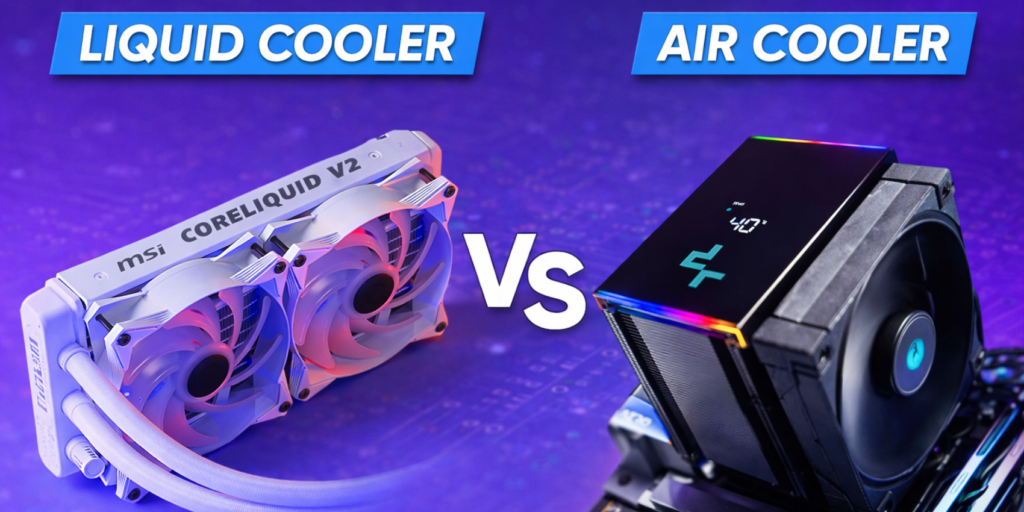
Spend ten minutes in any PC building forum and someone will tell you that a 360mm AIO is the only responsible choice for a gaming build. Spend another ten minutes and someone else will tell you it’s a waste of money and their $45 air cooler runs just as cold. Both people are partially right, which is exactly why this debate never ends. The real answer to liquid cooling vs air cooling isn’t about which technology is objectively better. It’s about which one is right for your specific CPU, your case, and your budget.
I’ve noticed that most beginners default to liquid cooling because it looks impressive and sounds more advanced. Most experienced builders I know have quietly gone the other direction, dropping their AIOs after a pump died mid-gaming session and switching to a dual-tower air cooler that’s been running without a single issue for years. Neither path is wrong, but there are clear scenarios where one makes more sense than the other, and this guide walks through each of them honestly.
The performance reality: how big is the gap between air cooler vs liquid?
The short answer is: smaller than most people think for gaming workloads. For 90 percent of gaming scenarios, a quality dual-tower air cooler like the Thermalright Phantom Spirit 120 EVO at around $50 performs within a few degrees of a 240mm AIO. That’s not a dramatic simplification. GamersNexus, which runs some of the most rigorous independent cooling tests in the industry, has repeatedly shown that budget dual-tower air coolers beat mid-range AIOs on noise normalized benchmarks, meaning when you control for sound levels, air keeps up or wins.
Where liquid pulls ahead is at high sustained loads. If your CPU is running at 200W or more continuously, like an Intel Core Ultra 9 285K doing simultaneous game streaming and rendering, a 360mm AIO handles that sustained heat better because it has more thermal mass to absorb spikes and more radiator surface to dissipate heat. A big air cooler handles those same chips adequately for pure gaming because games rarely pin a CPU at 100 percent load for more than a few seconds at a time.
One CPU worth calling out specifically is the AMD Ryzen 7 9800X3D. It’s one of the best gaming CPUs available right now, but its 3D V-Cache stacking acts as a thermal insulator between the cores and the heat spreader. The result is that it reports high internal temperatures even when its total heat output is relatively low, around 120W. I’ve seen a lot of people panic about those temperature readings and immediately buy a $150 AIO, when a $35 Thermalright Peerless Assassin often lands within 3 to 5 degrees of a flagship liquid cooler on that specific chip because the bottleneck is the IHS, not the cooler.
The reliability argument: why many experienced builders choose air
An air cooler is a block of metal and a fan. When it fails, the fan fails. You replace the fan for $10 to $20 and the cooler works again. That’s the entire failure analysis. From my experience, a good air cooler like the Noctua NH-D15 G2 can outlive two or three PC builds. Noctua actually provides free mounting hardware for new CPU sockets, so the same heatsink can move from platform to platform for years.
AIO liquid coolers are different. They have a pump, tubing, a radiator, and coolant, all of which have finite lifespans and several distinct ways to fail. Most manufacturers warrant their AIOs for 3 to 5 years, which is a quiet signal about what they expect. When the pump dies, which is the most common terminal failure, you get a CPU thermal shutdown within seconds. When coolant slowly permeates through the rubber tubing over years, you get gradual pump cavitation. Leaks are rare on modern closed-loop systems, but they’re not zero, and a leak near a GPU or motherboard is a catastrophic outcome.
| Factor | Air Cooling | Liquid Cooling (AIO) |
|---|---|---|
| Expected lifespan | 10+ years (fan replaceable) | 5-7 years (pump terminal) |
| Failure modes | Fan only ($10-20 fix) | Pump, permeation, leak |
| Catastrophic risk | Zero | Low but not zero |
| Maintenance | Dust every few months | Monitor pump RPM, check temps |
| Repairability | High | Replace entire unit |
| Platform reuse | Yes (mounting kits available) | Usually yes, check compatibility |
When liquid cooling is the right call for your build
There are specific situations where choosing liquid cooling vs air cooling in favor of liquid is clearly justified, and it’s worth being precise about what those situations are rather than applying blanket advice.
High-wattage CPUs under sustained load are the clearest case. If you’re running an Intel Core Ultra 9 285K at its 250W maximum turbo power while streaming and gaming simultaneously, a 360mm AIO handles that load more consistently than even the best dual-tower air cooler. The thermal mass of the liquid loop absorbs heat spikes more gradually, and the radiator mounted as a top or front exhaust moves that heat directly out of the case rather than letting it linger around other components.
Small form factor builds are the other clear use case. Compact ITX cases often don’t have room for a 170mm tall air tower, but they do have a radiator mount. Moving the heat exchange to the case wall with a 240mm AIO solves a geometry problem that air simply can’t solve in a 5-liter chassis.
| Your Situation | Best Choice | Reason |
|---|---|---|
| Ryzen 5 or Core Ultra 5, gaming only | Air Cooler | Any dual-tower at $40-60 handles this completely |
| Ryzen 7 9800X3D, gaming | Air Cooler | V-Cache IHS bottleneck limits AIO gains |
| Core Ultra 9 285K, gaming + streaming | 360mm AIO | Sustained 250W load favors liquid thermal mass |
| Small form factor (ITX) build | 240mm AIO | Height clearance limits air tower options |
| Showcase build, aesthetics priority | AIO | Cleaner look, LCD pump options, RGB flexibility |
| Budget under $800 total build | Air Cooler | Save $70-100 for GPU or RAM instead |
The noise question: which is actually quieter?
This is where the air cooler vs liquid debate gets genuinely nuanced. The common assumption is that liquid cooling is quieter, and at high loads that’s usually true. A 360mm radiator has about 50 percent more surface area than a large air cooler, which means its fans can stay at lower RPM while managing the same thermal load. At 1,000 RPM a radiator fan is nearly silent. An air cooler fan at 1,800 RPM trying to push heat through dense fins is not.
At idle and light gaming loads, however, a good air cooler is often quieter than an AIO because it has no pump. The pump in an AIO produces a constant background hum even when the CPU is barely working. Most players I know who game in a quiet room notice the pump hum immediately after switching from air. It’s not unpleasant, but it’s always there. Budget AIOs can also develop what the PC building community calls a “cement mixer” rattle if air bubbles get trapped in the pump impeller, which is an annoying failure mode that air simply doesn’t have.
The practical takeaway: for gaming specifically, where the CPU is rarely pinned at maximum load for extended periods, a quality dual-tower air cooler is usually quieter in everyday use. For workstation-style sustained loads, a 360mm AIO is quieter because it doesn’t have to spin fans as hard.
The bottom line on liquid cooling vs air cooling is this: most gamers building a system under $1,200 are better served by a $40 to $60 dual-tower air cooler and putting the saved money toward the GPU. If your CPU draws over 200W under sustained workloads, you game in a small form factor case, or you genuinely care about how your build looks more than anything else, a 360mm AIO earns its place. Every other scenario favors air for its simplicity, reliability, and value. Pick the right tool for what you’re actually doing and you won’t go wrong with either.
Frequently asked questions
Is liquid cooling better than air cooling for gaming?
Not necessarily, and for most gaming builds the difference is marginal. At typical gaming heat loads where a CPU draws 65 to 150W, a quality dual-tower air cooler performs within a few degrees of a 240mm or 360mm AIO on noise-normalized benchmarks. The advantage of liquid cooling becomes clear only under sustained high-wattage workloads of 200W or more, like simultaneous gaming and streaming on a flagship CPU. For a mid-range build focused purely on gaming, the $40 to $60 air cooler is often the smarter decision both financially and for long-term reliability.
How long does an AIO liquid cooler last compared to an air cooler?
An air cooler’s lifespan is effectively unlimited because its only moving part is the fan, which costs $10 to $20 to replace. Quality air coolers from Noctua or Thermalright commonly outlast multiple PC builds. AIO liquid coolers have a realistic lifespan of 5 to 7 years before pump failure or coolant permeation through the tubing becomes a concern. Most manufacturers reflect this in their 3 to 5 year warranties. When an AIO pump dies, the entire unit needs replacing since AIOs are not user-serviceable closed loops.
Do I need liquid cooling for the Ryzen 7 9800X3D?
No. The 9800X3D is one of the best gaming CPUs available, but its 3D V-Cache stacking creates a thermal insulation layer between the core dies and the heat spreader. This means the chip reports high temperatures even at relatively low power draw of around 120W because heat struggles to escape through the thick IHS. The practical effect is that even a $35 air cooler like the Thermalright Peerless Assassin 120 SE lands within 3 to 5 degrees of a $150 AIO on this chip, because the IHS is the actual bottleneck, not the cooler’s capacity. Save the AIO budget for a better GPU or more RAM.
Is an AIO quieter than an air cooler?
It depends on the workload. Under heavy sustained CPU loads, a 360mm AIO is usually quieter because its fans stay at lower RPM thanks to the larger radiator surface area. During gaming and light use, a quality air cooler is often quieter because it has no pump. AIO pumps produce a constant low-frequency hum at all times regardless of CPU activity, which some people find noticeable in a quiet room. Budget AIOs can also develop a rattling noise if air bubbles enter the pump impeller. At equal quality levels, air is typically quieter at idle and comparable under load.
What is the best budget air cooler for gaming in 2026?
The Thermalright Peerless Assassin 120 SE at around $35 is consistently one of the best value air coolers available. It’s a dual-tower design with two 120mm fans that handles virtually every mid-range gaming CPU without thermal throttling, at a price that leaves budget for other components that actually drive frame rates. The Thermalright Phantom Spirit 120 EVO at around $50 is a step up for slightly higher-wattage CPUs. Both are significantly better value than similarly priced AIO options when the comparison is pure gaming performance per dollar spent.