Fps isnt just a buzzword
Fps stands for frames per second. its literally how many individual images your pc or console cranks out every single second while youre gaming. think of it like a flipbook – the more pages you flip per second the smoother the animation looks.
Why does this matter? smoother gameplay, faster reactions, better aiming. its the difference between nailing that headshot and wondering why your crosshair felt like it was moving through mud.
Ever missed a shot in a shooter and blamed it on feeling laggy even though your ping was fine? yeah thats probably your fps struggling. when your game isnt rendering enough frames fast enough everything feels delayed and unresponsive. its frustrating as hell.
How fps works without the tech headache
Heres the basic idea. your graphics card renders images of the game world. your monitor displays those images. the more images per second the smoother everything looks and feels.
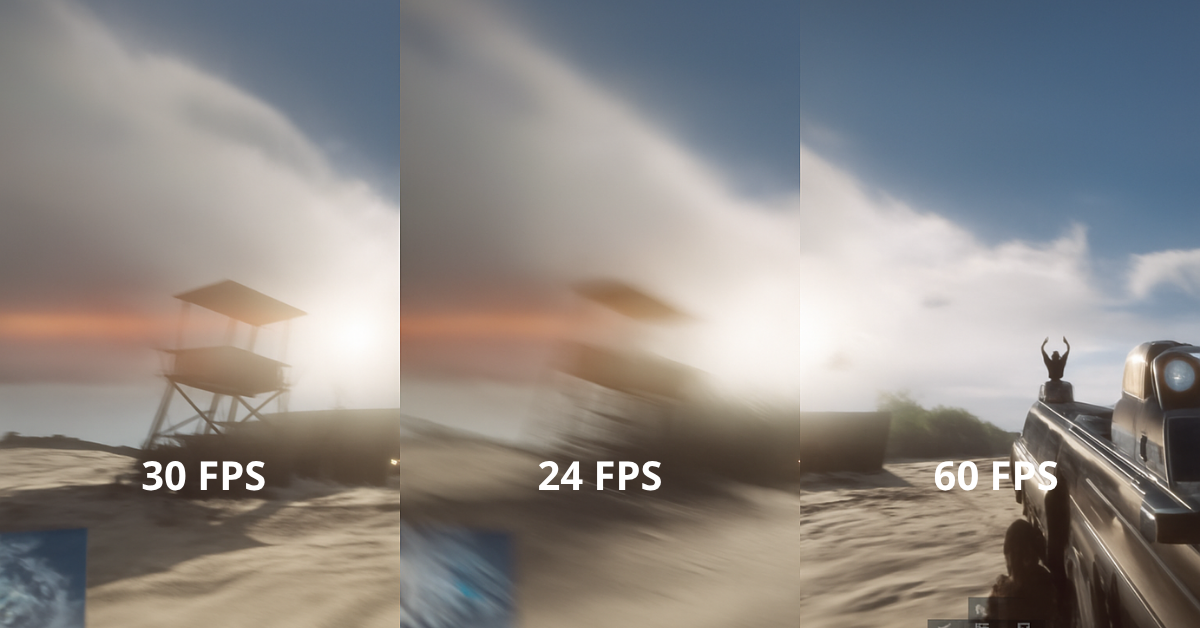
Most people break fps down into a few common ranges. 30 fps is what you get on a lot of console games. it works but once youve experienced better you cant unsee how choppy it feels. 60 fps is the smooth baseline that most pc gamers aim for as a minimum. its comfortable and responsive.
Then you get into the high refresh territory. 120 to 144 fps is where competitive players live. some esports pros even push 240 fps or higher because every millisecond counts when youre trying to go pro.
Theres also something called frametime which is how long it takes to render each individual frame. lower frametime means smoother more consistent motion. you can have decent average fps but if your frametimes are all over the place the game will still feel stuttery.
and fps ties directly into your monitors refresh rate. if your monitor only refreshes 60 times per second it can only show you 60 fps max even if your pc is pumping out 144 fps. thats why competitive gamers invest in high refresh rate monitors – to actually see all those extra frames their pc is generating.
input lag is also connected. higher fps usually means lower input lag because the game is updating more frequently. when you move your mouse or press a key theres a fresh frame ready to show that action faster.
What affects your fps and what you can actually control
Hardware bottlenecks
your gpu is usually the main factor in gaming performance. if youve got a weak graphics card no amount of tweaking will magically give you high fps in demanding games. your cpu matters too especially in games with tons of npcs or physics calculations. sometimes your cpu cant feed your gpu fast enough and you get a bottleneck.
ram can also limit you. 8gb is really pushing it these days. 16gb is the sweet spot. if you dont have enough ram your system starts using slow storage as memory and your fps tanks.
Game settings
this is where you have the most control. resolution is huge – running at 1440p or 4k requires way more horsepower than 1080p. if youre struggling with fps drop your resolution first.
textures, shadows, and lighting effects all impact performance. shadows especially are fps killers in a lot of games. turn those down from ultra to high or medium and watch your framerate jump.
ray tracing looks gorgeous but its incredibly demanding. unless you have a beast gpu you probably want to leave that off if you care about high fps.
anti aliasing smooths jagged edges but costs performance. often you can use a cheaper aa method or just lower it without noticing much visual difference.
Drivers and background tasks
outdated graphics drivers can absolutely murder your performance. gpu manufacturers constantly release updates that improve performance in new games. check for driver updates regularly.
background tasks matter too. if youve got chrome open with 50 tabs, discord, spotify, and a bunch of other apps running your system resources are split. close what you dont need while gaming.
Optimization tweaks
some people undervolt their gpu to reduce heat and maintain higher clock speeds longer. its not for everyone but it can help.
fan curves keep your components cool. hotter components throttle themselves and perform worse. setting an aggressive fan curve helps but makes things louder.
some games have config files you can edit to disable effects that tank fps without adding much visual quality. the competitive community usually figures these out fast for popular games.
How to measure and monitor fps
you cant fix what you cant see. monitoring your fps helps you understand whats actually happening and whether your changes are working.
Tools for monitoring fps
msi afterburner combined with rivatuner statistics server is the gold standard. free, lightweight, and shows you fps along with gpu and cpu temps and usage. you can customize what info shows on screen while you play.
steam has a built in fps counter. go to settings, in game, and enable the fps counter in whatever corner you want. super simple but just shows raw fps number.
a lot of games have built in fps counters too. check your graphics or display settings. some even show frametime graphs which are super useful for spotting stutters.
What to actually watch for
dont just look at average fps. your 1 percent lows matter way more for how smooth the game feels. if your average is 90 fps but your 1 percent lows drop to 30 fps youre gonna notice those stutters.
frame drops are when fps suddenly tanks for a moment. usually caused by the game loading something new or your system thermal throttling.
consistent frametime is what you want. if every frame takes roughly the same time to render the motion looks smooth. big frametime spikes feel terrible even if your average fps is high.
Does higher fps always matter
Casual vs competitive gaming
if youre playing single player story games casually 60 fps is totally fine. you dont need 144 fps to enjoy the latest rpg or action adventure game. smooth and stable beats chasing maximum fps.
competitive gaming is different. in shooters, mobas, or any pvp game higher fps gives you an edge. you see enemies sooner, your inputs register faster, and your aim feels more precise. thats why competitive players will lower every setting to minimum to squeeze out maximum fps.
Budget gamers priorities
if youre on a budget focus on stable fps over cranking everything to ultra. a game running at medium settings with locked 60 fps feels way better than ultra settings that dip between 35 and 50 fps.
you can always turn settings up later when you upgrade. but playing with choppy inconsistent performance sucks right now.
Finding your balance
think about what you actually play and what you value. love eye candy and play at your own pace? prioritize visuals and aim for stable 60 fps. grinding ranked in valorant or apex? drop those settings and push for 144 fps or higher.
your monitor matters too. if you only have a 60hz monitor theres no point stressing about hitting 120 fps. upgrade your monitor first or just lock fps at 60 and bump up visual quality.
dont bankrupt yourself chasing fps either. a solid 1080p 60 fps experience is genuinely good. you can enjoy basically every game at that level. higher is better but not at the cost of going broke or hating every game because youre obsessing over frame drops.
Wrapping up
fps is one of those things that once you understand it you cant stop noticing. but thats actually good because now you can make informed decisions about your settings and upgrades.
stable smooth fps makes every game feel better. whether thats 60 or 240 depends on your setup and what you play. find what works for your hardware and your games then just enjoy playing.
and remember the best fps is the one you dont have to think about because its smooth enough that you forget to check the counter. thats when you know youve nailed your settings.